Mirr Code
An AI coding agent rebuilt around how development teams work in Korea.
Korean instructions and choseong search, Hangul IME behavior, HWP and HWPX documents, organizational policy, and disconnected environments are treated as the starting conditions—not edge cases around the model.
Review Mirr Code for our environment- A developer requests a code change in Korean and attaches requirements from an HWPX document.
- Mirr Code gathers the relevant document, repository, and organizational context.
- It proposes the files to change, the validation path, and any permissions required.
- Within the approved boundary, it edits the code and runs type checks and tests.
- It returns a reviewable completion report covering changes, evidence, and remaining risk.
Connecting a strong model does not complete the development experience in Korea.
The language used to instruct a coding model can affect the result, and multilingual code-generation research shows that the effect varies by model and task. Widely cited evaluations still emphasize short, well-bounded exercises; they do not fully represent long sessions in which teams accumulate context in Korean.
The operational gap extends beyond a correct line of code. Hangul composition must survive cursor movement, commands must be discoverable from initials, mixed-language repositories must remain legible, and requirements in public-sector documents must connect to implementation. Mirr Code designs those touchpoints as one development interface rather than a translation layer.
The context stays intact while the agent reads the document, understands the repository, changes code, and verifies the result.
“Read the authorization requirements in business-plan.hwpx, add the missing validation to the current API, and run the relevant tests.”
- 01Understand the Korean requirements
Extract relevant body text, tables, and outline structure from HWP or HWPX and place the requirements in working context.
- 02Inspect repository and team rules
Read the project structure, current implementation, terminology, and repository instructions before narrowing the change.
- 03Plan work and check authority
Explain which files should change and why; request approval before risky tools or out-of-bound actions.
- 04Change and verify the code
Edit, format, type-check, and test in the same session, then use failures as inputs to recovery.
- 05Report a reviewable result
Summarize changed files, checks performed, residual risk, and the points that still need human judgment.
Not a translated interface—a development tool engineered to withstand Korean usage.
Korean is present from input and discovery through document understanding, project context, and the final explanation.
IME-safe editing
Composition text is not mistaken for committed input, and cursor movement or deletion is regression-tested while Hangul is being composed.
Command discovery from choseong
Korean, English, and initial-consonant search coexist. Ambiguous matches produce choices instead of executing arbitrarily.
HWP and HWPX as development context
Body text, tables, and outlines become usable requirements context. Encrypted documents stop with an explicit error rather than a guess.
Mixed-language repository fluency
The agent follows the terminology and notation already used by Korean-facing projects and mixed-language codebases.
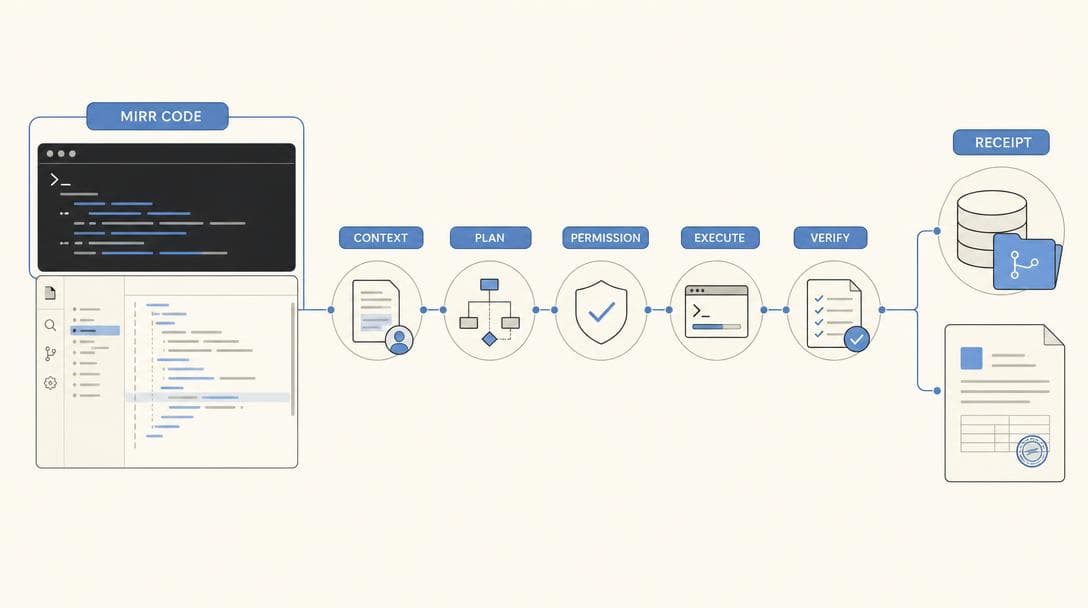
The session continues beyond a suggestion to a result the team can verify.
Mirr Code is an execution harness joining models, tools, permissions, checkpoints, and recovery around real repositories.
- 01repository · documents · instructions
Assemble context
Read code, configuration, documents, repository guidance, and current work state, selecting only what the task needs.
- 02plan · impact · validation
Plan the change
Decompose the objective, expose affected files and constraints, and define validation before execution.
- 03permissions · sandbox · approval
Execute within authority
Edit files and run tools only within the selected permission and sandbox policy; a person approves boundary changes.
- 04checkpoint · rewind · recovery
Recover from failure
Use checkpoints and rewind to leave a wrong direction safely and treat failed tests as new task context.
- 05diff · test · completion receipt
Prove completion
Return checks, results, changed scope, and residual concerns so a reviewer can reach a decision quickly.
Change the model or toolchain without abandoning the team’s operating controls.
CLI, TUI, headless execution, desktop, ACP, and HTTP surfaces share one runtime. Providers, tools, plugins, skills, MCP connections, and agents can be configured to the organization.
Development team
Begin in the terminal and editor workflow developers already use.
- CLI, TUI, and ACP
- Team commands, skills, and plugins
- Checkpoints and validation commands
Enterprise
Apply approved models, tools, guidance, and authorization to one working experience.
- Organizational policy and permission modes
- Private models and tool connections
- Auditable execution context
Public-sector and sovereign
Define explicit boundaries and failure behavior where external connectivity is restricted.
- On-premises and disconnected deployment
- Fail-closed air-gap behavior
- Execution through approved paths only
Korean-first is a regression surface, not a feature-list slogan.
Product evidence and research context are kept distinct. Comparative performance is not claimed until reproducible public evidence exists.
- Korean input
- IME composition, cursor movement, and deletion are maintained as product test surfaces
※ Confirm operating-system coverage against the version under evaluation.
- Command discovery
- Korean, English, and choseong search with explicit handling of ambiguous input
※ User choice takes priority over automatic execution.
- Document understanding
- HWP and HWPX extraction for body text, tables, and outlines
※ Encrypted files are not decrypted; format coverage is confirmed during evaluation.
- Multilingual code research
- Prompt language can influence code-generation results, with effects varying by model and taskLarge Language Models for Code Generation from Multilingual Prompts ↗
- Evaluation gap
- Existing code-generation evaluations underrepresent diverse natural-language instructionsHumanEval-XL ↗
Implementation boundaries remain visible to teams that need to inspect them.
Once the buyer understands the working value, architecture and operational conditions should be open to review.
One runtime, multiple surfaces
CLI, TUI, headless, desktop, ACP, and HTTP server modes share execution semantics for tools, permission, checkpoints, and task state.
Replaceable models and extension points
Providers and tools are not fixed to one vendor. Plugins, skills, MCP, agents, and ACP connections operate through the same runtime.
Permission and recovery as product behavior
Predictable authority enables useful autonomy. Confirmation, sandboxing, checkpoints, rewind, and error recovery sit inside the workflow.
Organization-specific evaluation
Representative repositories, documents, network boundaries, approval rules, and required development tools define the adoption test.
Evaluate Mirr Code on work your Korean-speaking development team actually does.
Bring a representative repository, document formats, security boundary, and required checks. We will show where the full session holds together—and where further integration is required.